BUY UPFRONT
Halloween Hands
$1.99 USD · one time
Purchase in the Connect IQ Store, then install your watch face.
Coming soon to Connect IQ Frozen DuckWATCH FACES
ORIGINAL GARMIN WATCH FACES
Turn a glance at your wrist into a small escape. Illustrated worlds, expressive clock hands, and the time you can actually read.
Meet Halloween HandsOur first face is coming soon. $1.99, one time.
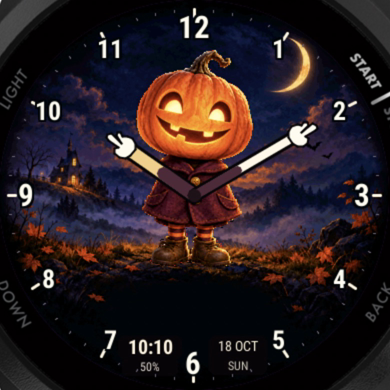
Actual simulator image. Forerunner 165.
THE FIRST CHAPTER
A glowing pumpkin. A crooked little house. A moonlit path home. Halloween Hands brings autumn to your wrist, all year if you like.
HALLOWEEN HANDS
Our pumpkin points out the hour and minute with two distinct clock arms. Twelve bold numbers keep the dial readable against the detailed scene.
First release planned for Forerunner 165. Other models are not currently supported.
Choose the edition that suits you. Both have the same artwork and features.
BUY UPFRONT
$1.99 USD · one time
Purchase in the Connect IQ Store, then install your watch face.
Coming soon to Connect IQTRY ON YOUR WATCH
$1.99 USD · one-time unlock
Install free and try the full face for 20 minutes. When the trial ends, choose whether to unlock it. No automatic charge.
Trial edition coming soonPrices are the USD base price. Taxes, currency conversion and any payment processing fee are shown at checkout. Each edition is a separate purchase; purchases do not transfer between editions. The full-feature trial lasts 20 minutes.
WHEN THE ADVENTURE RESTS
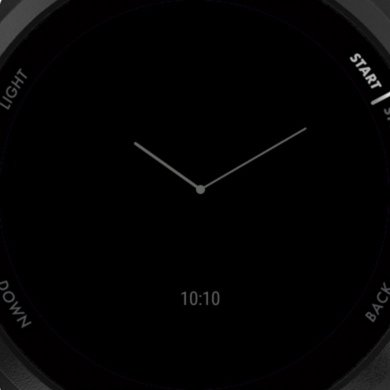
In always-on mode, the illustration and animation rest. A simple clock remains, so the time stays easy to find.
A HAND WHEN YOU NEED ONE
Installation, trial and purchase help, all in one place.
Once released, open its Connect IQ Store listing on your phone, check that your watch is supported, then choose Download or Buy. Keep your watch connected to Garmin Connect and let it sync. This website will link to both editions when they are available.
No. The 20-minute full-feature trial does not ask for a card or start a subscription. When it ends, the watch displays instructions for an optional one-time purchase. You can choose a different face instead. The upfront edition is paid for before installation.
After the trial ends, use the code shown on your watch at the secure unlock checkout. Keep your phone connected and online while unlocking. No purchase is available until this watch face launches.
For the trial edition, use Restore purchase with the current watch code and the email used at checkout. For the upfront edition, use the Garmin account that purchased it. Check that you installed the same edition; purchases do not transfer between the two.
No. The optional wake animation lasts about three seconds, then settles. The dial stays still in always-on mode. The website demo repeats so you can see the movement; the watch does not loop continuously.
In the Connect IQ app, open My Device, select the installed watch face and open Settings. You can adjust hand accent, the status readout, digital time and wake animation. Sync your watch after saving.
The first release targets Garmin Forerunner 165. The current visuals are simulator captures; real-device validation and store approval are still in progress. Do not buy for another model unless its store listing explicitly includes it.
Email support@frozenducktech.com with the face name, edition, watch model and what happened. For the trial edition, payment and refund help is available through the checkout provider. For an upfront purchase, use Garmin’s purchase support. Please do not email passwords or card details.
SAY HELLO